Clifford Meece Personal Blog
Thoughts, stories and ideas.
The Fence Problem, Generalized
If you took calculus, you probably remember this problem:
You have 100 feet of fence. Build a rectangle. Maximize the area.
It's a classic optimization exercise. But I noticed something about the answer that my textbook never pointed out — something that holds not just for rectangles, but for any rectilinear shape you can draw.
Part 1: The Rectangle
Here's the setup. You have a rectangle with width $w$ and height $h$:
The perimeter constraint is:
$$2w + 2h = 100$$
So $h = 50 - w$. The area is:
$$A = w \cdot h = w(50 - w) = 50w - w^2$$
Take the derivative and set it to zero:
$$\frac{dA}{dw} = 50 - 2w = 0$$
$$w = 25, \quad h = 25$$
The answer is a square. Area = 625 sq ft. Everyone knows this.
But notice something about the solution. The total length of the horizontal segments is $w + w
Cojones: A Game I Wrote in 1994, Rewritten in One Prompt
In 1994 I wrote a game. I was learning Java — not JavaScript, Java — and the AWT toolkit was the only way to put graphics on screen. Applets ran in browsers. This was before CSS existed.
The game was a marble puzzle called Cojones. You move colored marbles around a grid, trying to line up three or more of the same color before the board fills up. It's similar to Color Lines or Lines 98 if you've played those. Simple rules, surprisingly deep strategy.
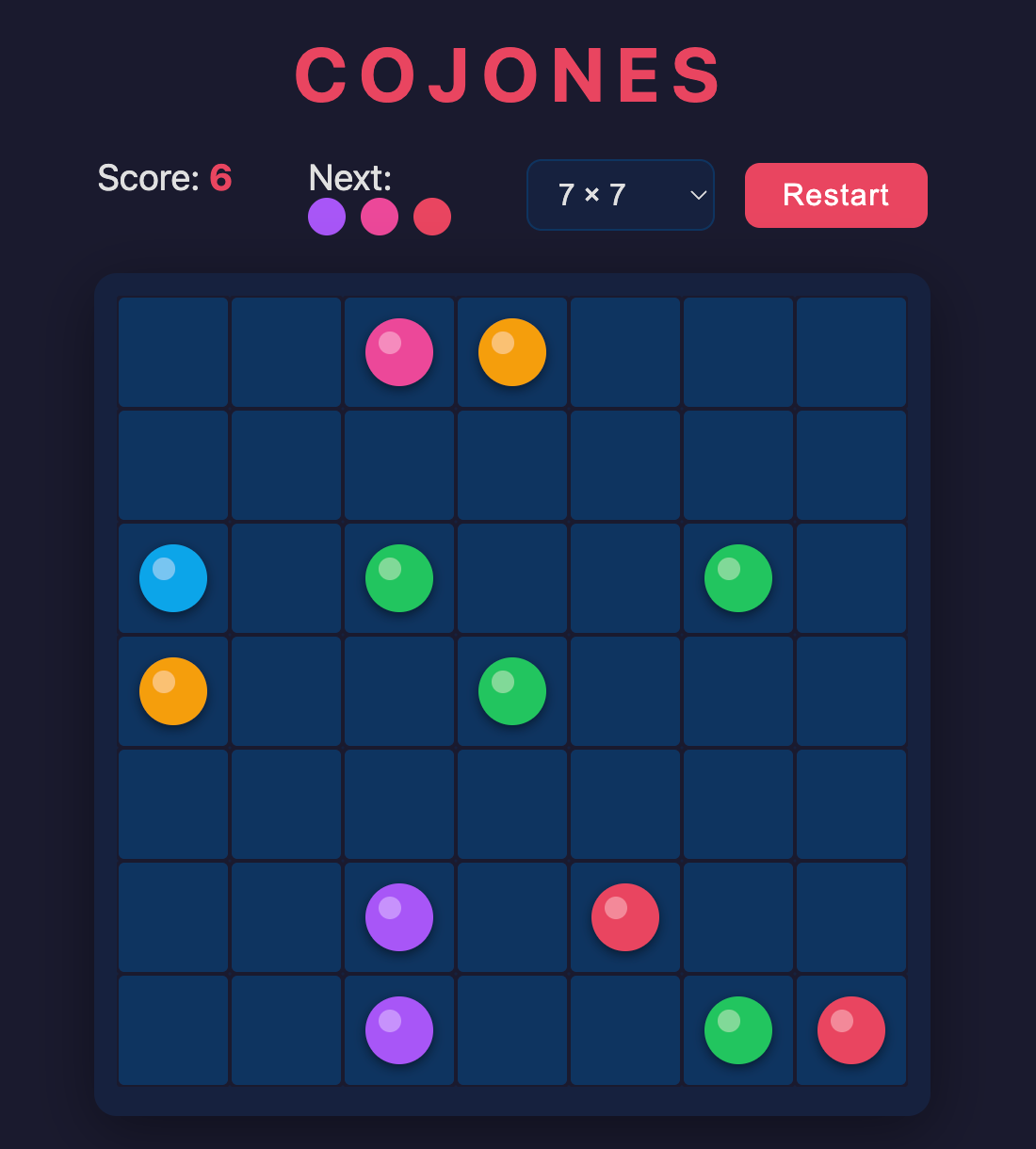
What Made It Matter
I didn't know how to program when I started. I knew loops and if-statements. That's it. Building this game taught me things that textbooks hadn't:
Adjacency. How do you know which squares a marble can reach? You can't just check if the destination is empty — you need a path of empty squares connecting them. I didn't know the word "
mattercli: Mattermost from the Command Line
There's no good CLI for Mattermost. mmctl is admin-only — server management, not messaging. Matterhorn is a TUI that takes over your terminal. Neither one lets you script a bot posting to a channel, search messages, upload a file, or fire a webhook from a shell script.
So I built one. 17 commands, zero required dependencies, two binaries (mattercli and mm).
Install
npm install -g mattercli
Setup
mattercli init
Interactive — asks for your Mattermost URL, bot token or PAT, and team name. Saves to ~/.mattercli/config.json (chmod 600). Or use environment variables if you prefer:
export MATTERCLI_URL=https://mattermost.example.com
export MATTERCLI_TOKEN=your-token
What It Does
mm post general "deploy started"          # post to a channel
mm dm @clifford "check the logs"          # direct message
mm recent general 10                      # last 10 messages
mm search "deployment failed"             # full-text search
mm thread <gho: Manage Ghost from the Terminal
I got tired of writing throwaway Node scripts every time I needed to create or publish a Ghost post programmatically. So I wrapped the Ghost Admin API in a zero-dependency CLI.
Install
npm install -g @abeedoo/gho
Setup
Create a .gho file in your project with your Ghost Admin API credentials:
GHOST_URL=https://your-site.com
GHOST_ADMIN_API_KEY=your-id:your-secret
Get the key from Ghost Admin → Settings → Integrations → Add custom integration.
What It Does
gho list posts                    # list all posts
gho list posts --status draft     # drafts only
gho draft my-slug "Title" post.md # create draft from markdown
gho publish my-slug               # publish it
gho unpublish my-slug             # back to draft
gho update my-slug updated.md     # update content
gho get my-slug                   # show post details
gho delete my-slug                # delete
gho tags                          # list tags by usage
That's the whole API. No subcommands to memorize, no config generators, no interactive
Radish Components: 70 Svelte 5 Components on DaisyUI
We just published @abeedoo/radish-components — a Svelte 5 component library built on DaisyUI v5 and Tailwind CSS v4. 70+ components, zero custom CSS, all utility classes.
Playground · npm · GitHub
Why
We build a lot of admin panels and internal tools with SvelteKit. Every project needs the same things — data tables, forms, modals, toasts, dropdowns. DaisyUI gives us beautiful utility classes, but we were copying component files between projects and slowly watching them diverge.
So we extracted them into a shared library. Every component uses DaisyUI classes directly — no custom CSS, no CSS-in-JS, no shadow DOM. If you know DaisyUI, you already know how these are styled.
What's In It
70+ components across 7 categories:
- Actions — Button, Dropdown, Swap, ThemeController
- Data Display — Accordion, Avatar, Badge, Carousel, ChatBubble, CodeBlock, Collapse, Countdown, Kbd, List, Stat, Status, Table, Timeline
- Data Input — Calendar, Checkbox, FileInput, FormField, Radio, Range, Rating, Select, TextInput, Textarea, DateRangeInput, DropZone, SearchInput,
dendriteJS v2: Mind Maps in Canvas and SVG
Back in 2012 I built a little interactive mind map tool using Processing.js. It drew bezier curves between draggable nodes, you could add children by clicking a plus button, and the whole thing ran in a canvas. Processing.js died, the code rotted, and I forgot about it.
I dug it up recently and rewrote it from scratch. No dependencies. Dual renderers — Canvas and SVG. Published as an npm package.
What It Does
It's an interactive mind map. Nodes branch from a central root with bezier curves. You drag nodes around, add children, rename things. Nodes flip sides (and color) when you drag them across the
Gödel's Junk Drawer
I have a problem with organization. Not a lack of it — an excess.
At some point I discovered clear plastic shoe boxes from The Container Store. They stack, they're uniform, they're transparent so you can see what's in them. I started putting things in shoe boxes. Batteries in one. Cables in another. First aid supplies. Sewing kit. Tape. Velcro.
Then more shoe boxes. Climbing gear — carabiners sorted by type, slings by length, cams by size. Camping supplies. Tools. Then construction materials — a whole cabinet of screws sorted by gauge and length, another of fittings, another of doorknobs and hinges and strike plates from every project I'd ever done or might do. Hundreds of shoe boxes. It was a system and the system was growing.
But the thing about a system that ambitious is that it's always half-finished. Some boxes were meticulously labeled. Others had things in them from three reorganizations
Announcing bigdesign-svelte
We just published @abeedoo/bigdesign-svelte — a Svelte 5 port of BigCommerce's BigDesign component library. 52 components, zero dependencies, MIT licensed.
Playground: bigdesign-svelte.abeedoo.com
npm: @abeedoo/bigdesign-svelte
GitHub: abeedoolabs/bigdesign-svelte
Why
If you're building a BigCommerce app with Svelte, you need your UI to match the BigCommerce admin panel. BigDesign is BigCommerce's official design system — but it's React-only. We needed it in Svelte for a couple of production apps, so we ported it.
What's In the Box
52 components across 8 categories:
- Layout — Box, Flex, Grid, Panel, Collapse, AccordionPanel
- Actions — Button, ButtonGroup, Link, Dropdown
- Forms — Input, Textarea, Select, MultiSelect, Checkbox, Radio, Switch, Toggle, Counter, Search, Datepicker, FileUploader, Fieldset, Form
- Data Display — Typography (H0–H4, Text, Small), HR, Badge, Chip, Lozenge, List, Table, StatefulTable
- Feedback — Alert, InlineMessage, Message, StatusMessage, ProgressBar, ProgressCircle
- Navigation — Tabs, PillTabs, Stepper, OffsetPagination, StatelessPagination
- Overlays — Modal, Tooltip, Popover
- Specialized — AnchorNav, Timepicker, Tree, StatefulTree, TableNext, Worksheet, FeatureSet
Quick Start
Your Singletons Are Multiplying
If you're building a full-stack app with Vite and you have any server-side singletons — schedulers, database connections, telemetry adapters, bootstrap flags — you probably have a bug you haven't noticed yet.
The Symptom
Our dev server kept crashing with out-of-memory errors. Not immediately — it would run fine for a while, then slow down, then die. Restarting fixed it. For a while.
The Cause
We had a job scheduler that ran on an interval:
let scheduler: JobScheduler | null = null;

export function getScheduler() {
  if (!scheduler) {
    scheduler = new JobScheduler();
    scheduler.start(); // setInterval inside
  }
  return scheduler;
}
This is the standard singleton pattern. It works perfectly in production. In development, it's a memory leak.
Every time Vite performs a hot module reload, the module re-executes. scheduler resets to null. getScheduler() creates a new one with a new setInterval. But the old interval is still running — setInterval lives on the global event loop, not in module scope.
The $effect Trap
If you're building anything real-time in Svelte 5 — SSE, WebSockets, polling — you will probably hit this.
The Setup
You have a reactive state object and an $effect that sets up a listener. The listener pushes new data into the state:
let data = $state({ messages: [] });

$effect(() => {
  const source = new EventSource('/api/events');
  source.onmessage = (e) => {
    data.messages = [...data.messages, JSON.parse(e.data)];
  };
  return () => source.close();
});
This looks fine. It blows up.
What Happens
The $effect reads data.messages (in the spread) and writes data.messages (the assignment). Svelte 5's reactivity tracks every read inside an effect. When the write invalidates what was read, the effect re-runs. Which sets up a new EventSource. Which fires. Which writes. Which re-runs the effect.
Infinite loop. Your browser tab dies.
The Fix
One function: untrack().
import { untrack } from 'svelte';

let data = $state({ messages: [] });

$effect(() => {
  const source = new EventSource('/